Open topic with navigation
PhenoGen Website Overview
The PhenoGen website shares experimental data with a worldwide community
of investigators and provides a flexible, integrated, multi-resolution
repository of neuroscience transcriptomic genetic data for collaborative
research on genomic disorders.
The website provides a comprehensive system to organize, query, analyze,
and retrieve high-throughput gene expression data, as well as providing
users with computational tools for integrated analysis of neuroscience
data, biomedical literature, gene functional annotations, and Quantitative
Trait Loci (QTLs).
The PhenoGen website allows data to be classified as "Semi-public"
or "Open Access". All of the information about the data uploaded
at the PhenoGen website is visible to every registered user (see "Registering an Account" for details). Registered users have full access to data that is classified
as "Open Access" and do not need to obtain permission from the
curator (Principal Investigator) of the data. "Semi-public"
data can only be accessed and downloaded after the curator of the data
grants a user permission to do so. Registered users can use the data for
"in-silico" analysis or can download the data for analysis with
their own statistical software.
The website also has nine pre-compiled
“Public” microarray datasets that can be used and downloaded by all registered
users for gene expression analysis, including correlating with user-provided
phenotype data. These datasets include inbred and recombinant inbred mice
and rat strains.
The PhenoGen website allows you to:
- Upload microarray raw data
into a MIAME-compliant database.
- Upload gene lists.
- Share data with other investigators
around the world.
- Search literature and save
results.
- Translate gene identifiers
to and from multiple databases.
- Determine phenotypic QTLs
using BXD recombinant inbred mice, HXB/BXH recombinant inbred rats, or
LXS recombinant inbred mice.
- Match physical location of
genes of interest and their eQTL to phenotypic QTLs.
- Correlate gene expression
with a phenotype.
You can also perform:
- Microarray data quality control
analysis and normalization.
- Data filtering (noise filtering).
- Statistical analyses, including
the most common statistical tests and permutations.
- Promoter analysis (transcription
factors).
- Queries about genetic variations
(e.g. SNPs or polymorphisms) in the transcripts of interest.
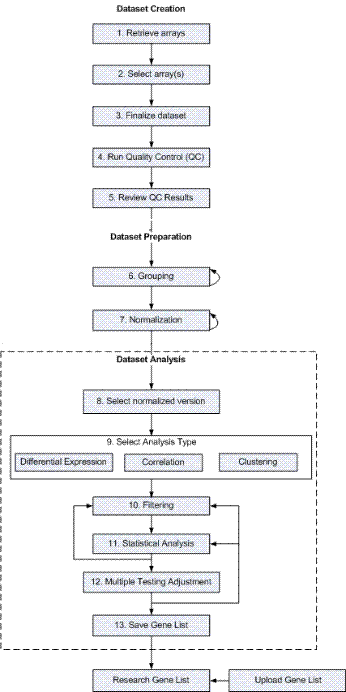
Website Process Flow for Microarray Analyses
|
Analyze Microarray Data
The process flow for a microarray analysis is:
Dataset Creation
Upload
microarray data. If you have microarray data from a lab experiment,
you can upload it into a MIAME-compliant database that is part of the
PhenoGen website.
- Retrieve arrays.
- Select and merge
arrays from the data repository.
- Finalize dataset.
- Run quality control
measures on the merged arrays.
- Review quality control
results.
Dataset
Preparation
- Group the arrays based on your hypothesis
(e.g., disease vs. control).
- Normalize the dataset.
Dataset Analysis
- Select a single normalized
version.
- Select analysis type.
- Filter genes.
- Perform statistical
analysis.
- Perform a multiple
testing adjustment
- Save gene lists.
Research Gene Lists
Do one of the following to enter a gene list
in PhenoGen:
- Generate a gene list from
microarray analysis (see the preceding Analyze Microarray Data section.)
OR
- Upload a gene list if you
have an existing gene list to interpret.
When your gene list is on the website, use
the annotation, QTL, literature search, and promoter analysis tools to
help interpret your list of candidate genes.
|
|